In just a few steps, you can connect your Deutsche Post Portokasse account to Shippinglabel and generate shipping labels for Standardbriefe, Kompaktbriefe, and more. This guide walks you through the process in detail.
Requirements
Before you begin, please ensure:
- You have an active Deutsche Post Portokasse account:
🔗 https://portokasse.deutschepost.de - You know your Portokasse credentials (username and password).
- (Optional) You can request a test account for testing purposes. Contact: pcf-1click@deutschepost.de
Step-by-step Setup Guide
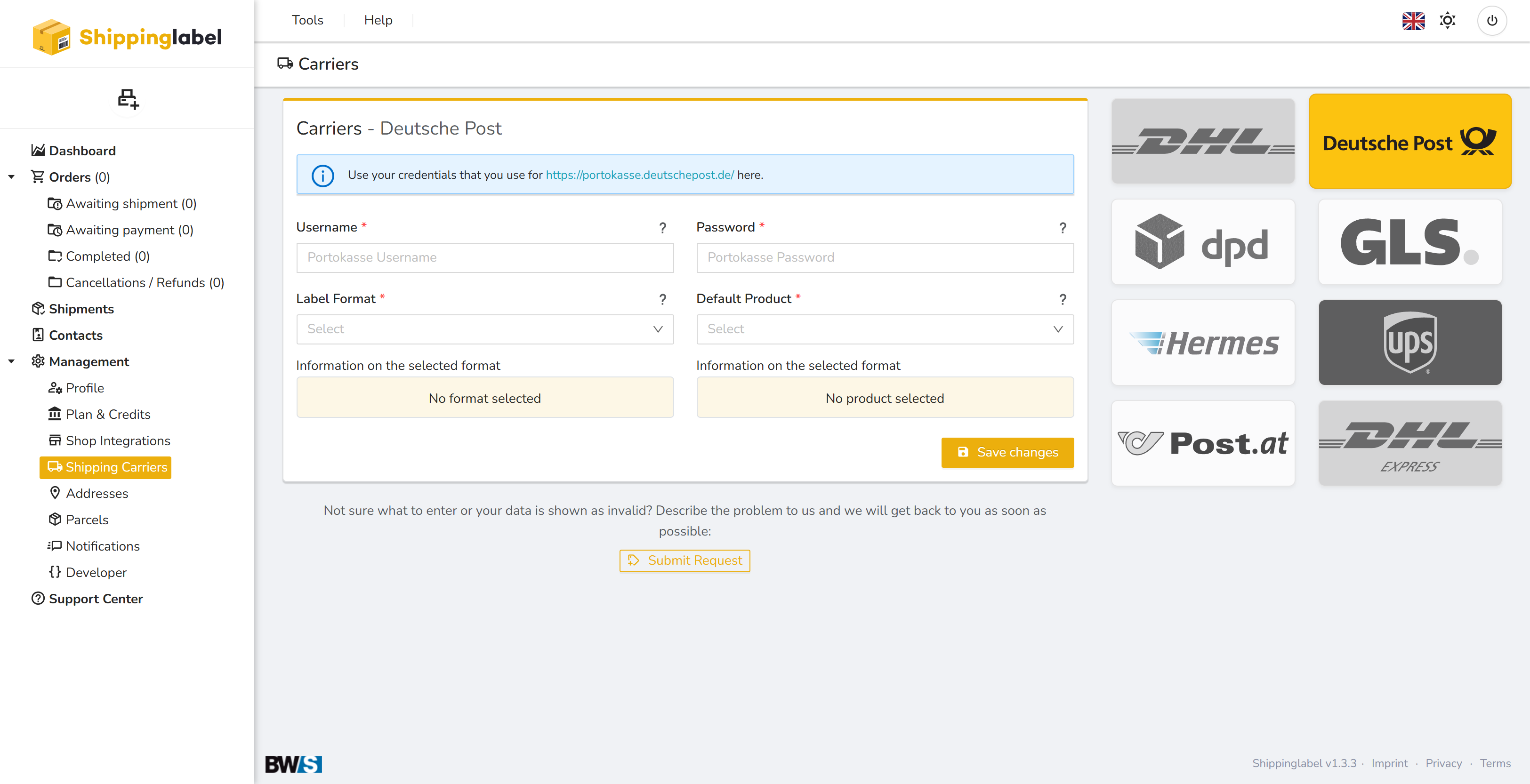
1. Open the “Shipping Carriers” section
Log in to Shippinglabel.
Go to Management > Shipping Carriers in the left sidebar.
Click the Deutsche Post logo.
2. Enter your credentials
Enter your Portokasse credentials in the corresponding fields:
- Username – Your Portokasse username
- Password – Your Portokasse password
🔐 The credentials are stored securely and not publicly visible.
3. Select a Label Format
Choose your preferred format from the Label Format dropdown, e.g.:
- Brother DK-22212 continuous label 62 mm (with address box)
- Other compatible formats
You’ll immediately see additional technical details about the selected format:
- Address box: Yes/No
- Labels per page
- Print layout
4. Select a Default Product
Choose your desired Default Product, e.g.:
- Standardbrief
- Kompaktbrief
- Großbrief
Additional product information will appear automatically:
- Dimensions and weight
- Price
- Minimum dimension requirements
5. Test connection (optional)
Click Test connection to ensure your credentials are valid.
6. Save changes
Click Save changes to activate and store the connection.
Troubleshooting
If your inputs are rejected or no postage labels can be generated:
- Double-check your username and password (case sensitive)
- Make sure your Portokasse account is active and funded
- Ensure you’ve selected a valid product and supported label format
- For persistent issues, contact:
📧 pcf-1click@deutschepost.de
Or use the Submit Request button within Shippinglabel
✅ Summary of Required Fields
| Field | Description |
|---|---|
| Username | Your Deutsche Post Portokasse login |
| Password | Password for your Portokasse account |
| Label Format | Selection of compatible label sizes and layouts |
| Default Product | Postal product (e.g., Standardbrief, Großbrief) |